Diagonales Images · Fiches · Dans Firefly
Dans FireflyFirefly Video peut-il animer un personnage à partir d'une image ?
Animer une image avec Firefly Video. Le prompt exact, le modèle et la plateforme utilisés, et le résultat obtenu.
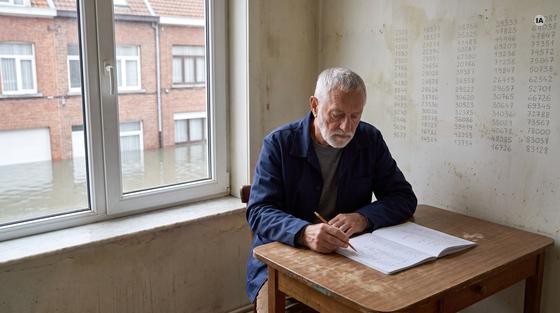
- Modèle
- Firefly Video
- Plateforme
- Adobe Firefly
- Réglages
- Même image de départ que la fiche Veo 3.1 ; 5 s, sans son ; 250 crédits Firefly
Le prompt
Realistic cinematic video of a 68-year-old man with short grey hair and a neat grey beard, wearing a navy work jacket over a grey sweater, sitting alone at a small kitchen table in a modest third-floor flat of an old Brussels house, the wall behind him covered with columns of pencil-written numbers. He slowly finishes writing a number in his notebook, gently lays the pencil down on the table, then gradually turns his head toward the window on the left and looks out at the calm floodwater. Soft grey daylight from the window, muted washed-out colours. Captured in a medium shot from eye level, the camera stays completely still. The overall tone is quiet and heavy, with natural skin texture, fine film grain and muted grey-blue tones.
Vous obtiendrez
Une vidéo de 5 secondes sans son. Ce qui est sorti : le geste est faux et le crayon disparaît.
À surveiller
Modèle d'Adobe, mais pas fait pour un acteur qui joue. Réservez Firefly Video aux plans sans acteur : paysage, mer, météo, objet. Pour un geste, Veo 3.1 dans Firefly a donné un meilleur résultat avec la même image (voir la fiche Veo 3.1).
Copier le prompt en un clic
Ouvrir la version interactive de cette fiche : le texte se copie en un clic.